I’ve been working on a blog, for a while now. The content strategy is solid — pillar posts, cluster articles, the whole architecture — but the actual execution? Writing a 2,000-word SEO post from scratch, structuring it, adding tables, internal links, tagging it correctly, and then publishing it? That takes hours. And honestly, some days I just don’t have those hours.
So today I tried something I’d been putting off: I handed the whole thing off to Claude Cowork and just… let it run.
Here’s exactly what I did, what Claude did, and what came out the other end.
What Is Claude Cowork?
If you haven’t heard of it — Claude Cowork is Anthropic’s agentic task runner. Unlike just chatting with Claude in a normal window, Cowork lets Claude actually do things on your behalf: search the web, open tools, connect to apps, and work through multi-step tasks without you having to babysit every move.
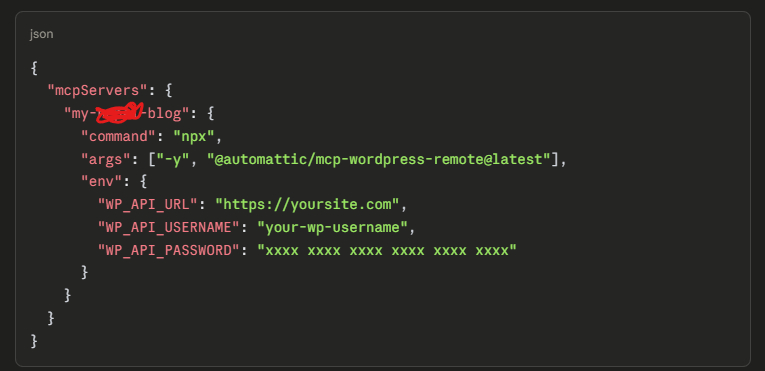
The key thing is the MCP connection. MCP (Model Context Protocol) lets Claude plug into external platforms directly. In my case, I had my WordPress blog on Hostinger connected to Claude via an MCP server. That means Claude didn’t just write a draft for me to paste in — it had actual write access to my site.
Before kicking anything off, I made sure my blog MCP was connected in the Claude interface. Hostinger’s AI Assistant plugin exposes the WordPress REST API — things like creating posts, managing categories, adding tags, and publishing — all as callable functions.
Once that was connected, Claude had the ability to:
- Create and publish posts
- Manage categories and tags
- Search existing posts (so it could link internally)
- Read site settings
I’d already connected this previously, so today it was ready to go.
I kept the instruction straightforward. I told Claude Cowork:
Write a [blog title] on my blog. It should cover the [blog subtopics]. Structure it for SEO, assign it to the [category], add relevant tags. Assign the blog post to a particular editor and publish it on their name. Finally send an email to me(admin) and the editor to review and publish.
That’s it. I didn’t write an outline. I didn’t prep the content. I just described the output I wanted.
Step 3: What Claude Actually Did
This is the part that was genuinely cool to watch. Claude didn’t just write the post and push it to my wordpress in one shot. It worked through the task in logical steps.
First, it figured out the existing structure. Before creating anything, Claude searched my existing posts to understand what I’d already published. This mattered because it needed to know what was already covered and where to add internal links.
Then it wrote the full article. The proper pillar-style post running roughly 2,000 words. It covered literally everything I wanted including a four-question FAQ section targeting common search queries
It formatted everything properly for WordPress. H2 and H3 headings, bullet lists, a proper data table for costs, bold for key figures and terms. It didn’t just dump a wall of text.
It added internal links. In the conclusion section, Claude linked out to my existing post — using the actual live URL from my site, which it already knew from the MCP search earlier. That’s exactly the kind of link I’d want connecting a pillar post to a cluster article.
It assigned the right category and tags. These weren’t random — they matched the tag taxonomy I’d already been using on the site.
Then it published it. I had explicitely asked Claude not to publish it. I wanted my editor to review it first before pushing it to the public.
Step 4: What I Did During All This
Yes FIFA World Cup is happening and Panama is Playing England. Half Time Score(0-0).
Genuinely? Not much. I watched the Cowork session as Claude moved through each step. It logged what it was doing — searching posts, drafting content, calling the WordPress create endpoint, publishing. The whole thing took maybe 8–10 minutes start to finish.
The only moment I actively intervened was to confirm at the end that the post was pushed as draft. I checked and it was there, formatted correctly, category and tags in place.
What I Actually Think About It
There are some caveats I’d be honest about.
The writing is good — genuinely more structured and comprehensive than a quick first draft I’d pull together under time pressure. It would have taken me a while to compile and format. But it doesn’t sound exactly like me. The voice is solid and informative, not robotic, but it doesn’t have the little personal asides and quirks that make a blog feel like a person wrote it which is why I did not wanted it to publish.
Each post will now have a personal human voice and it will to be accurate, comprehensive, and well-structured.
For a post about my experience I’d still write that myself.
The other thing worth noting: Claude handled the existing taxonomy correctly because it searched my site first. It didn’t guess at categories or invent new tags. That matters — messy taxonomy is annoying to clean up.
Would I Do It Again?
Yes, without question. The use case is specific though: informational, SEO-focused posts where the brief is clear and the structure is conventional. Giving Claude Cowork a task like writing a comprehensive blog post is a totally appropriate use. The output was properly structured, correctly categorized, and internally linked — in about ten minutes.
That’s time I can use to work on the posts that actually need me.